
Orbit
Your schedule revolves around you. An adaptive weekly planner for university students who work casual shifts: it builds a balanced week around the commitments they already have, and re-plans with their approval when a shift changes. An individual project for my Master of Design at Monash, 2026.
- Project
- MDC5310 Studio Part 1, Monash University
- Type
- Individual project
- My role
- Everything: research, interaction and visual design, prototype, video
- Platform
- Mobile app
- 4iterations, from calendar-first to student-first
- 10key screens across understand, plan, adapt and recover
- 0changes applied without the student’s approval
Where it started
Orbit began with my own workaround. Whenever a casual shift moved, I rebuilt my week by hand: checking several calendars, deciding again where every gym session and study block should go, and finding clashes only after they had already happened.
Using a lead-user approach, I treated that workaround as the brief: what would a planner look like if it did the rebuilding for me, and for every other student juggling study and casual work?
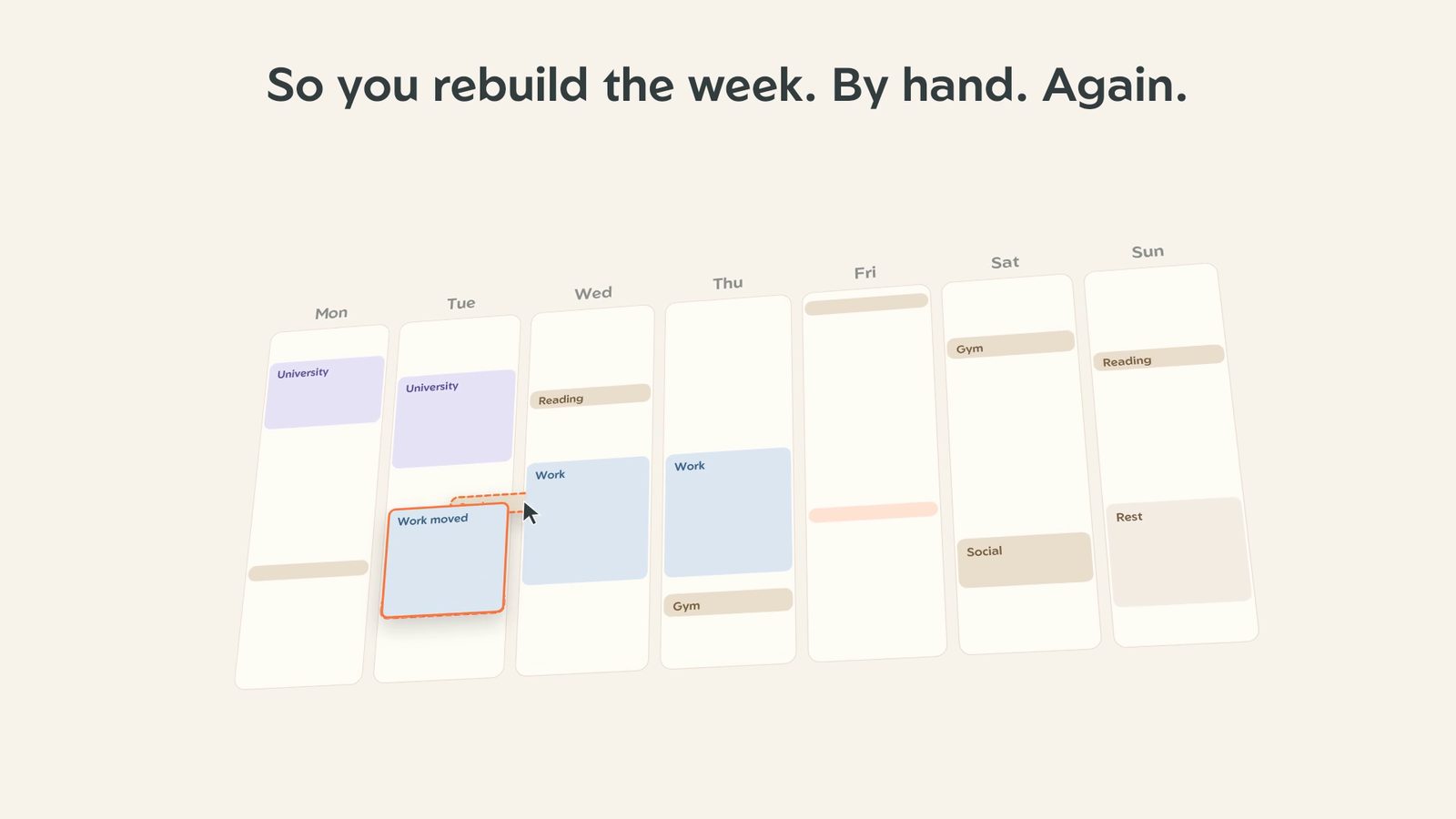
The opening of the Orbit promo video. My manual workaround What Orbit does instead Checking several calendars for fixed commitments Reads the existing Google Calendar, read-only Deciding where every gym session and walk should go Generates a balanced week from stated goals Spotting clashes only after a shift has moved Flags overlaps the moment work changes Rebuilding the week by hand Suggests moves with reasons, applied only on approval Letting a missed task slide Offers one realistic way to recover My role
Orbit was an individual project for my Master of Design, so every part of it was mine:
- Lead-user research, starting from my own planning workaround.
- The design brief: concept statement, need statement, pentad and two interaction design principles.
- The interaction flow across four stages: understand, plan, adapt and recover.
- The visual concept: colour, typography, the mascot’s moods and the orbit metaphor.
- Four iterations of the prototype, shaped by peer review and a usability test.
- The promo video and the design documentation.
The problem
"University students who rely on casual employment need a way to adapt their weekly commitments around unpredictable work schedules, because existing planning methods require constant manual adjustments and cannot keep up with changing priorities."
My need statementPicture a Tuesday. A shift changes to 3:00 to 8:00 PM, and the study session and gym planned for that afternoon now sit inside work hours. Nothing tells you. You find out when you’re already late for one of them.
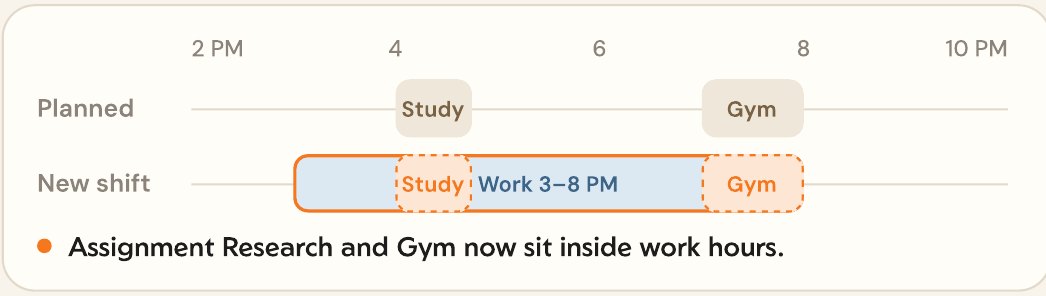
The lead-user scene: the planned afternoon against the new shift. Who it’s for
University students who also work casually, whose availability changes at short notice, who replan their week often and still want a realistic balance.
The lead user
A university student who also works casually, with availability that changes at short notice.
Their week
Classes, shifts, assignments, fitness, hobbies, friends and rest, all competing for the same hours.
What they want
A balanced week that holds up when work moves, without rebuilding it by hand every time.
The idea
Orbit is an adaptive weekly planner built around the student’s real life. It reads existing commitments from their calendar, learns the routine they want, creates a balanced week, and adapts it when life changes. It identifies what can move and suggests realistic alternatives, and the student stays in control of every decision.
The whole experience is one continuous flow in four stages: understand, plan, adapt and recover.
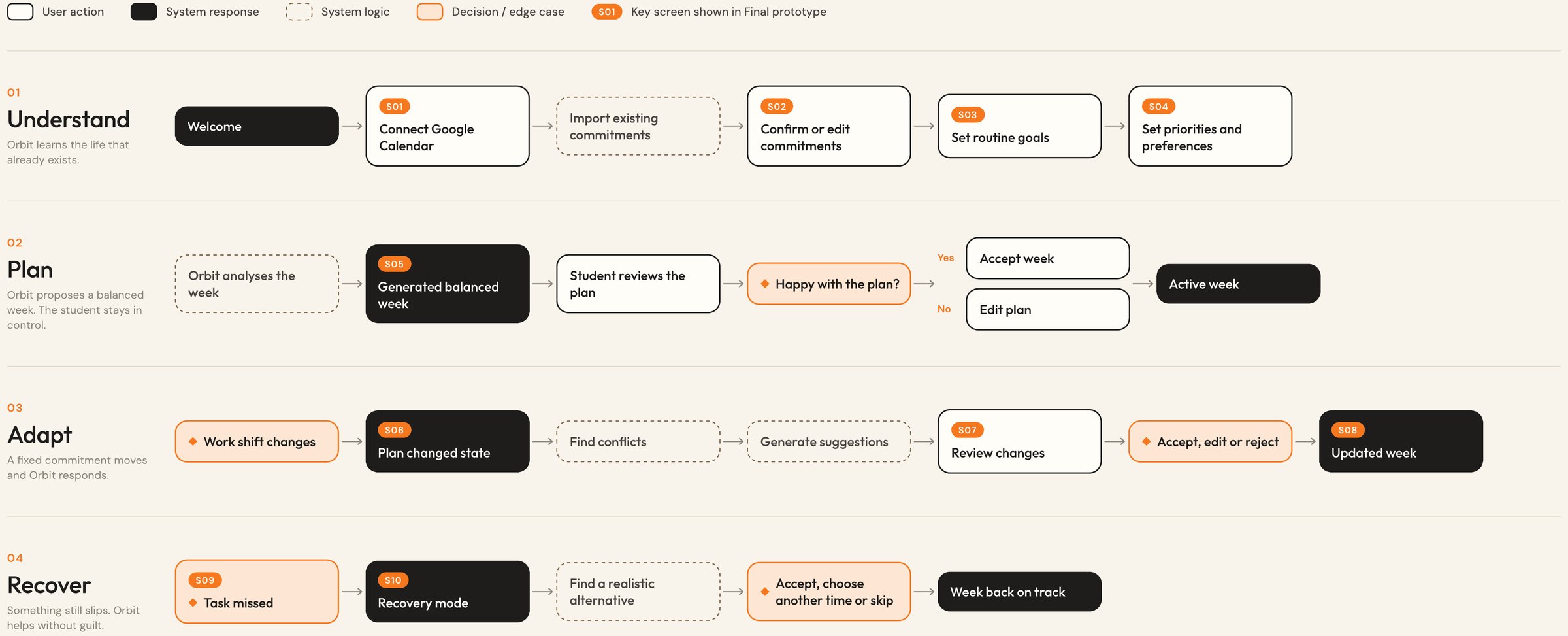
The interaction flow. Select it to open it full size. Two interaction design principles
Immediate feedback. When a commitment changes, Orbit responds straight away. It names what changed and which activities are affected, so the student never discovers a clash on their own.
Minimise memory load. Each suggestion keeps the whole decision in view: what changed, what’s affected, where it moves and why. The student decides from the screen, not from memory.
Four iterations
Orbit changed shape four times, from a planner that looked like every other calendar to an assistant that explains itself and waits for permission.
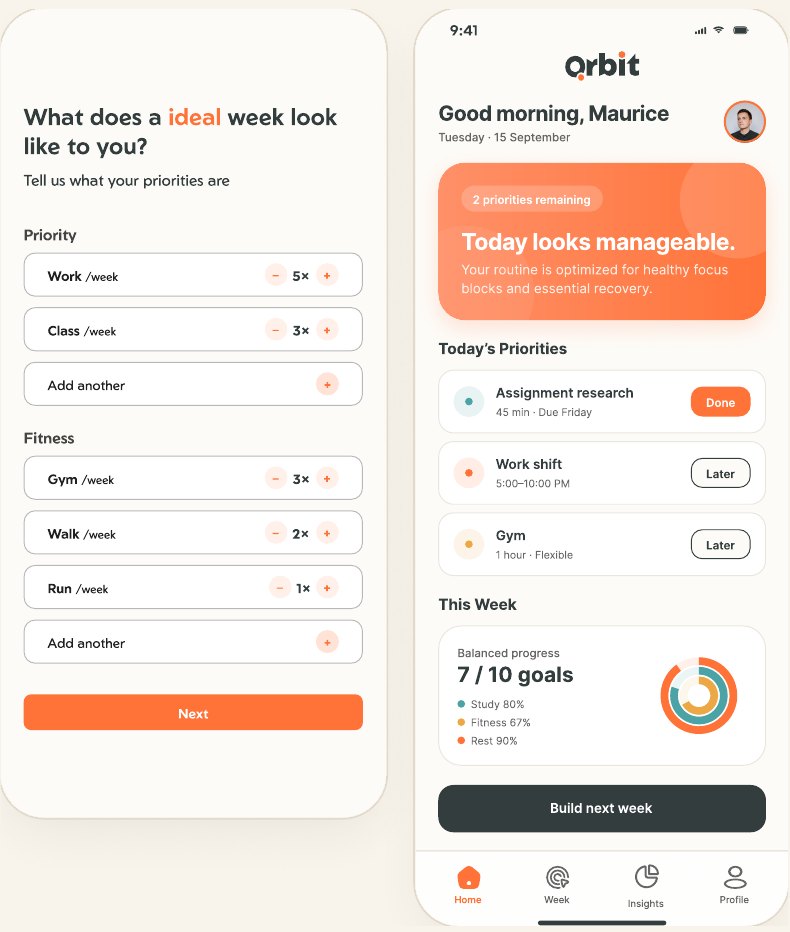
Iteration 1, calendar-first
Traditional planner
I combined a calendar, a task list and routine tracking. Onboarding asked students to type in how often they work, study and train, and the home screen tracked streaks and goal percentages.
What was wrong: It behaved like the calendars and to-do lists students already use. Replanning was still manual, and streaks added productivity pressure.
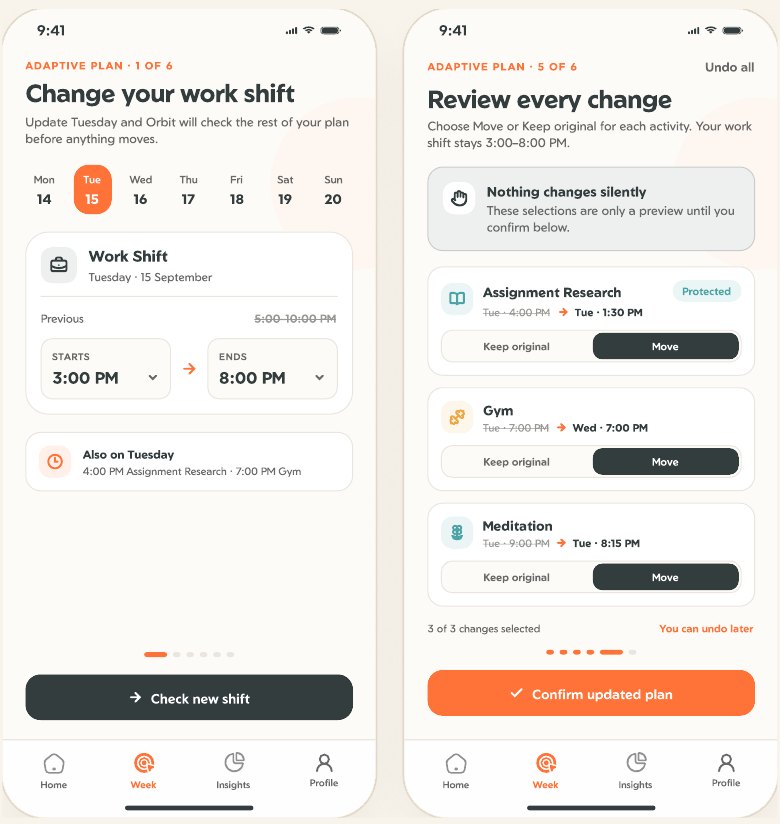
Iteration 2, change-first
Adaptive planner
I shifted to one question: what happens when the student’s week changes? This version introduced fixed and flexible activities, conflict detection and suggested moves.
What was wrong: Commitments were still entered by hand, and the only choices were Move or Keep original, with little explanation of why.
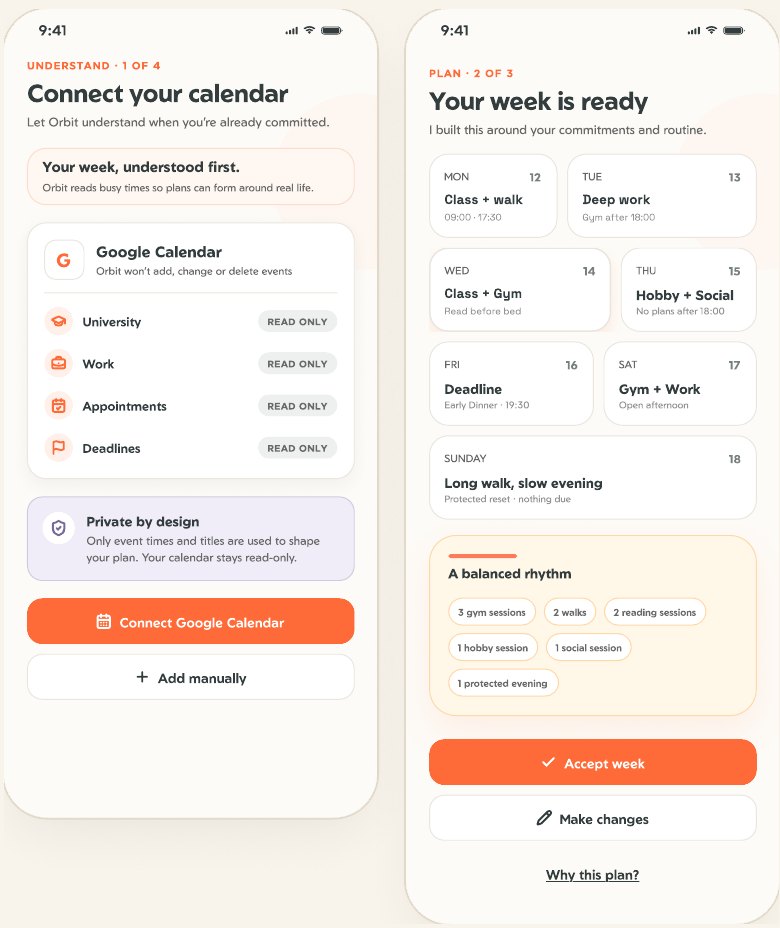
Iteration 3, life-first
Understand, plan, adapt
Google Calendar became the source of fixed commitments. Onboarding now asked what the student wanted their week to look like, and Orbit generated the balanced week.
Still to solve: Adapting the plan needed to feel like the student’s decision, not the system’s.
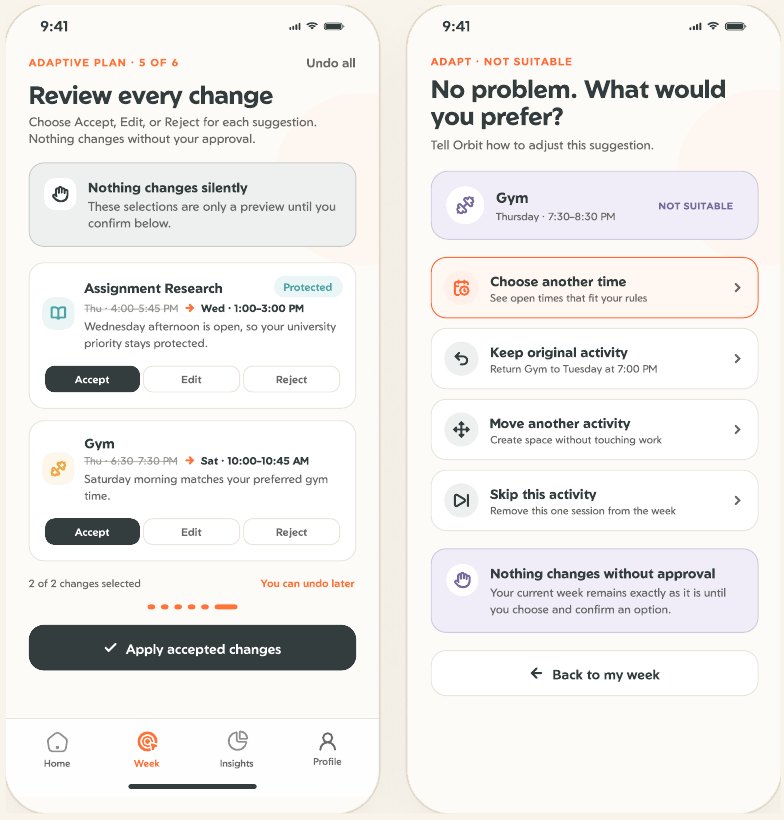
Iteration 4, student-first
User-controlled intelligence
Every suggestion became a recommendation with a reason. Students accept, edit or reject each change, and nothing applies until they confirm.
Result: Orbit acts as an assistant, not an autonomous system running the student’s life.
Testing and feedback
Usability test
I asked a participant to review a planned week, then respond to a work shift moving from 2:00 to 7:00 PM to 5:00 to 10:00 PM. They found the affected study and gym activities and understood Orbit’s suggested alternatives. The test showed that the “your plan changed” state needed to be more visually prominent, with a clear reason for every move.
Peer review
Peers raised three things:
- They wanted to understand how Orbit decides which activities should move.
- Onboarding asked for too much information before Orbit could generate a useful week.
- Connecting Google Calendar would let Orbit fetch classes, shifts and other commitments directly, making setup faster and more realistic.
In response, I added a Google Calendar connection to onboarding, let students move activities themselves, and added an explanation for why Orbit recommends each time. Together, these made the relationship between the student’s commitments, the generated routine and the replanning much clearer.
Visual concept
Warm, calm and quietly playful. Orange is kept for the moments that matter: primary buttons, selected states, important notifications, progress and suggestions.
- Warm cream#F8F4EC
- Charcoal#1F1D1B
- Soft orange#F5781F
- University#E7E3F6
- Work#DCE8F2
- Flexible#EFE7DA
- Suggestion#FDE7D4
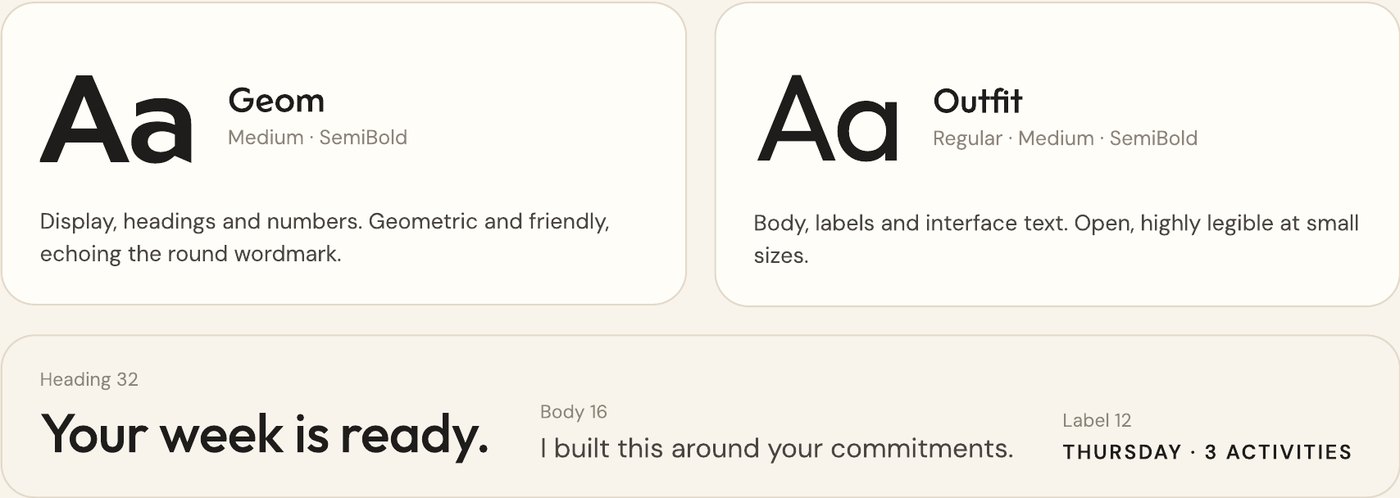
Geom for headings and numbers echoes the round wordmark. Outfit keeps body text legible at small sizes. 
The mascot sets the emotional tone, especially when the week changes or a task is missed. It stays small and never competes with the plan. The core metaphor: your life is the centre
Fixed commitments like classes and shifts form a stable inner ring that Orbit protects. Flexible activities like the gym, study and hobbies sit on the outer ring and glide to a new slot when something changes. It’s shown through motion, circular progress and curved paths, never planets or space graphics.
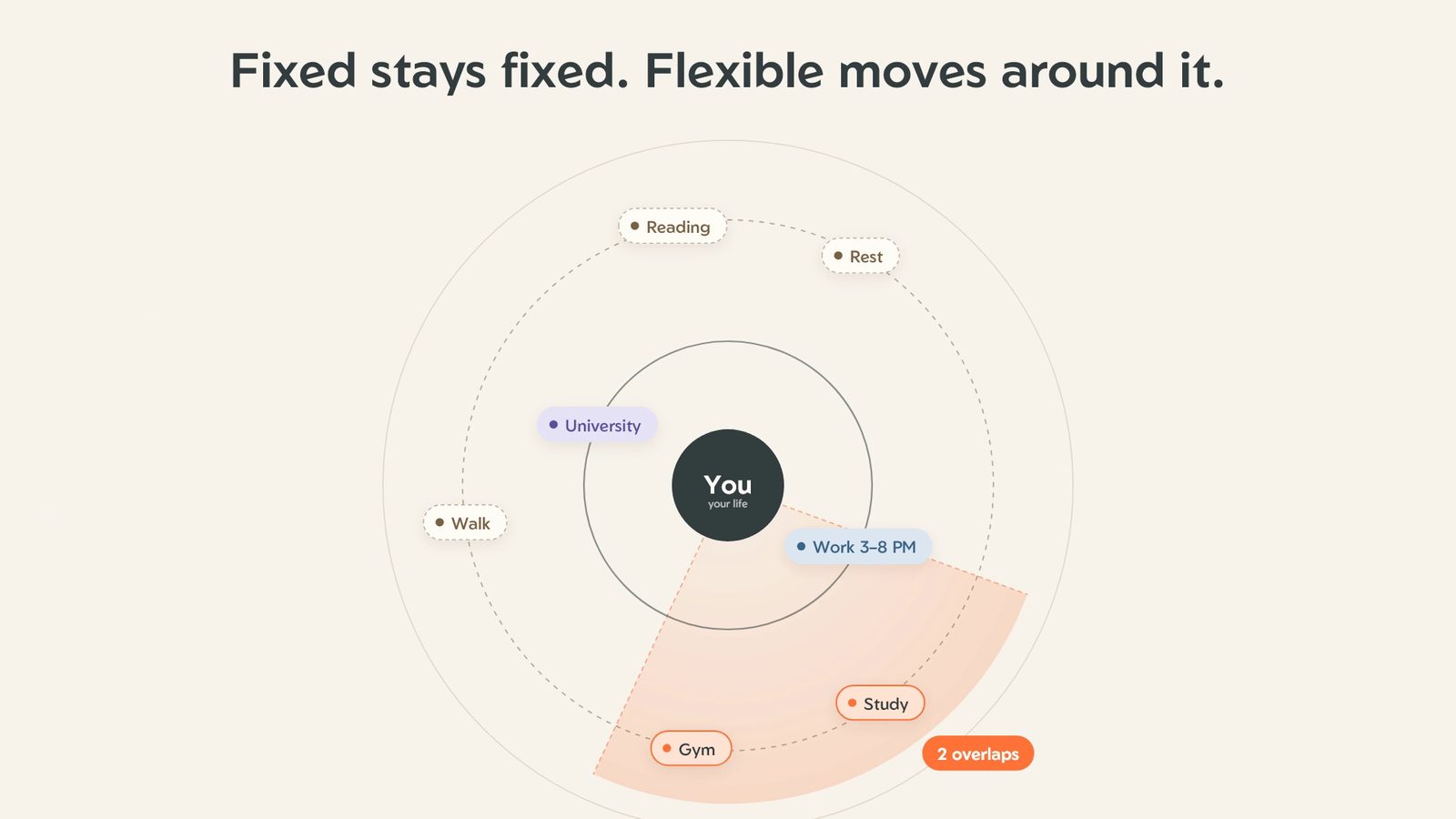
A new shift lands, and two flexible activities clash with it. 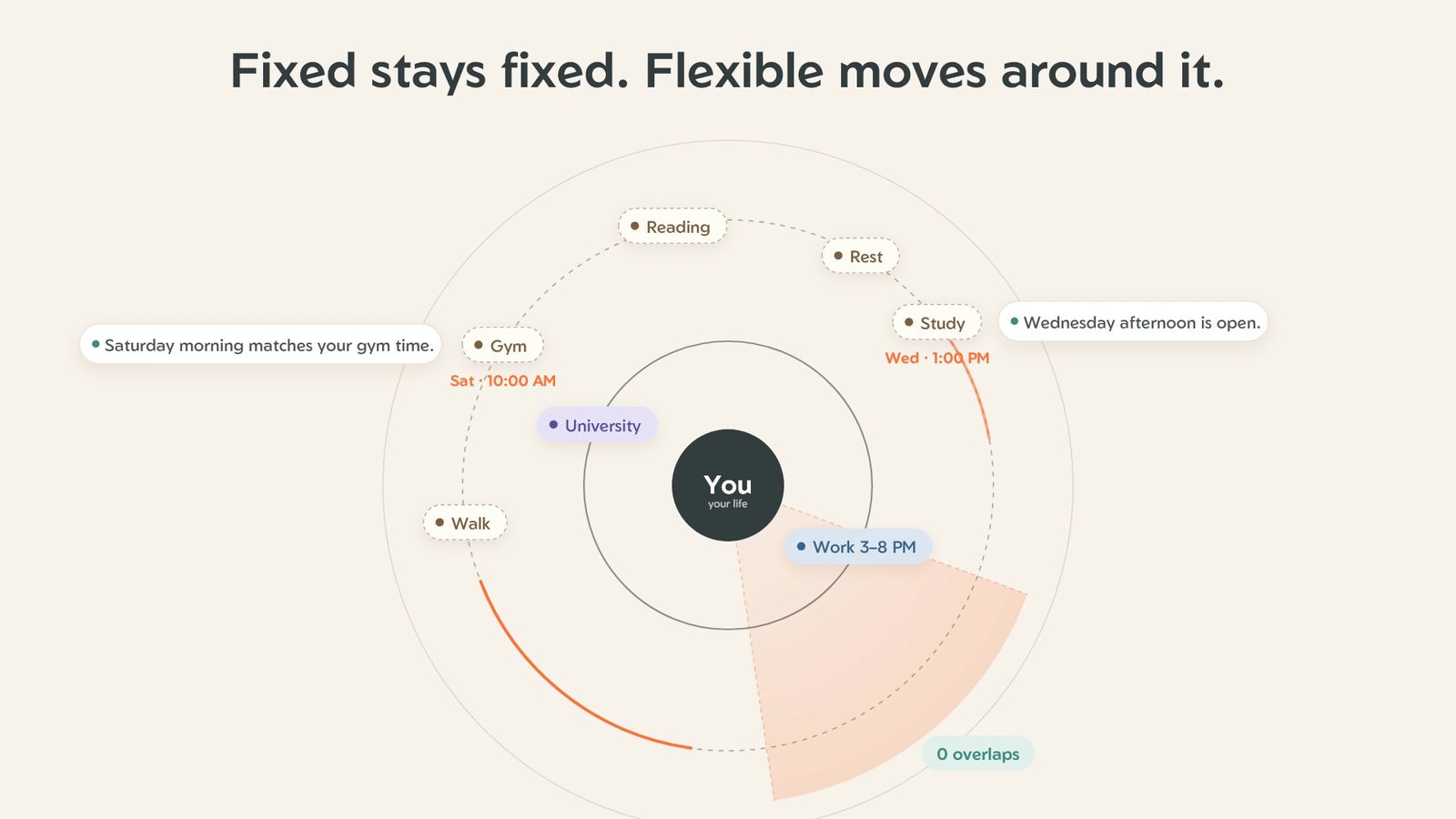
Flexible activities glide to open slots. Zero overlaps. Final design
The final prototype follows the interaction flow from start to finish. Select any screen to see it full size.
Understand
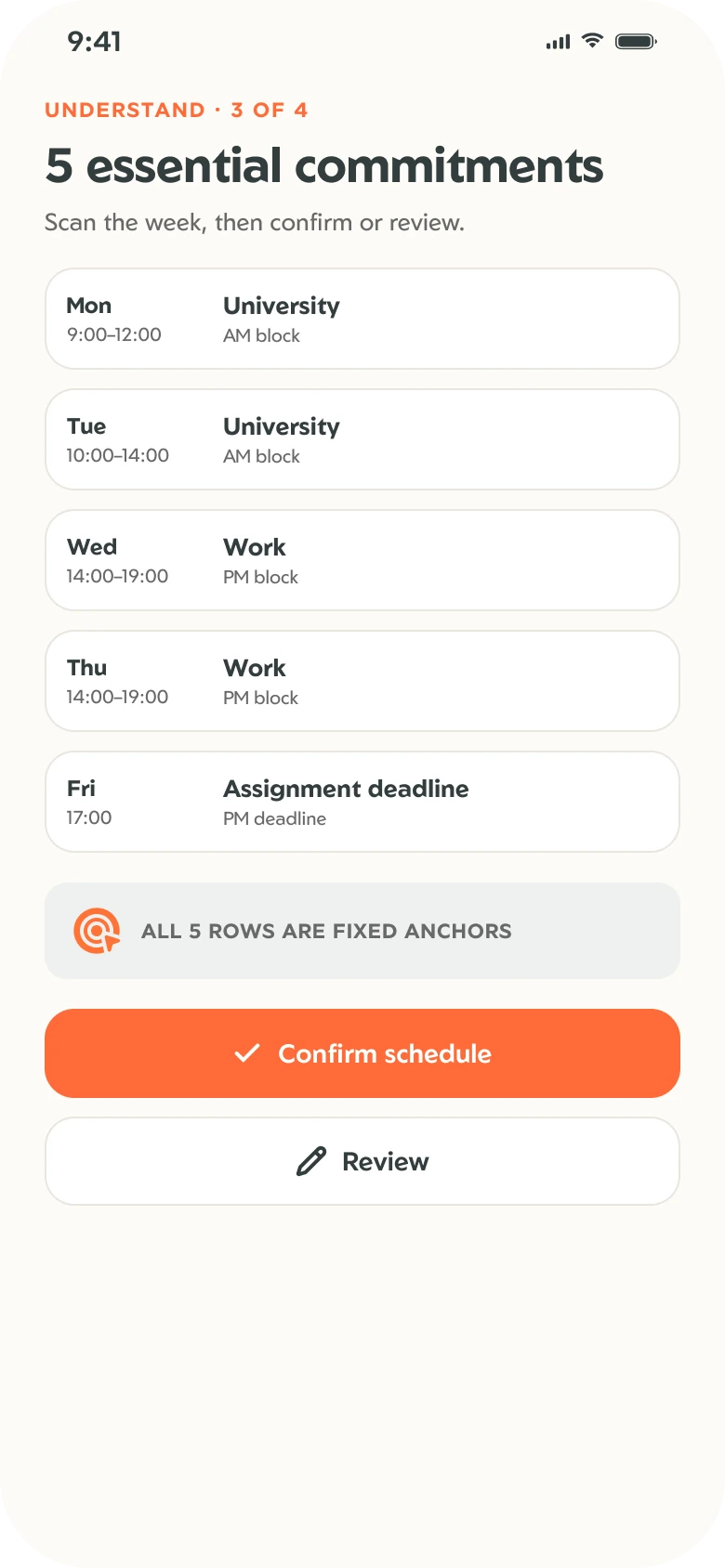
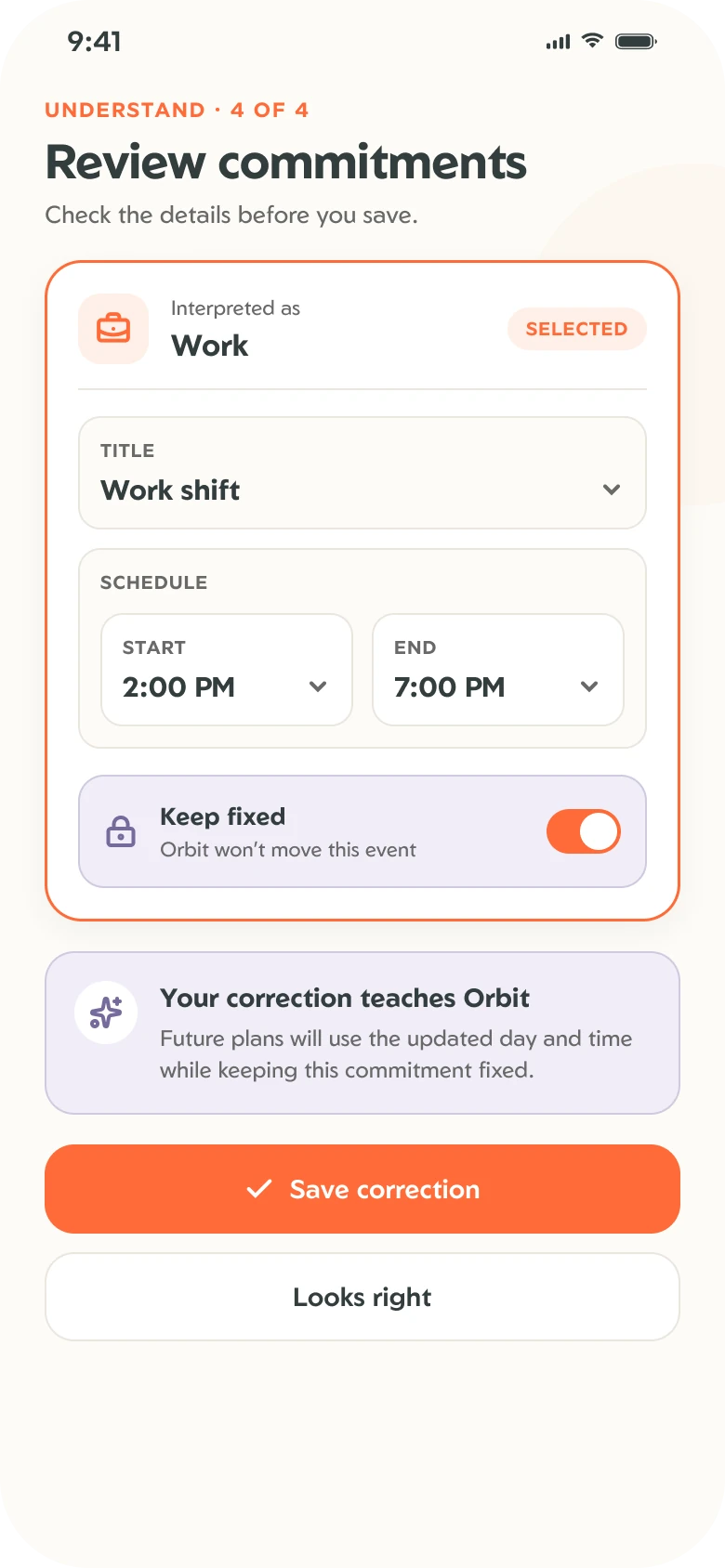
Orbit starts from the life the student already has. It reads their calendar, read-only, and asks them to confirm what it found before planning anything.
- Connect the calendar, read-only
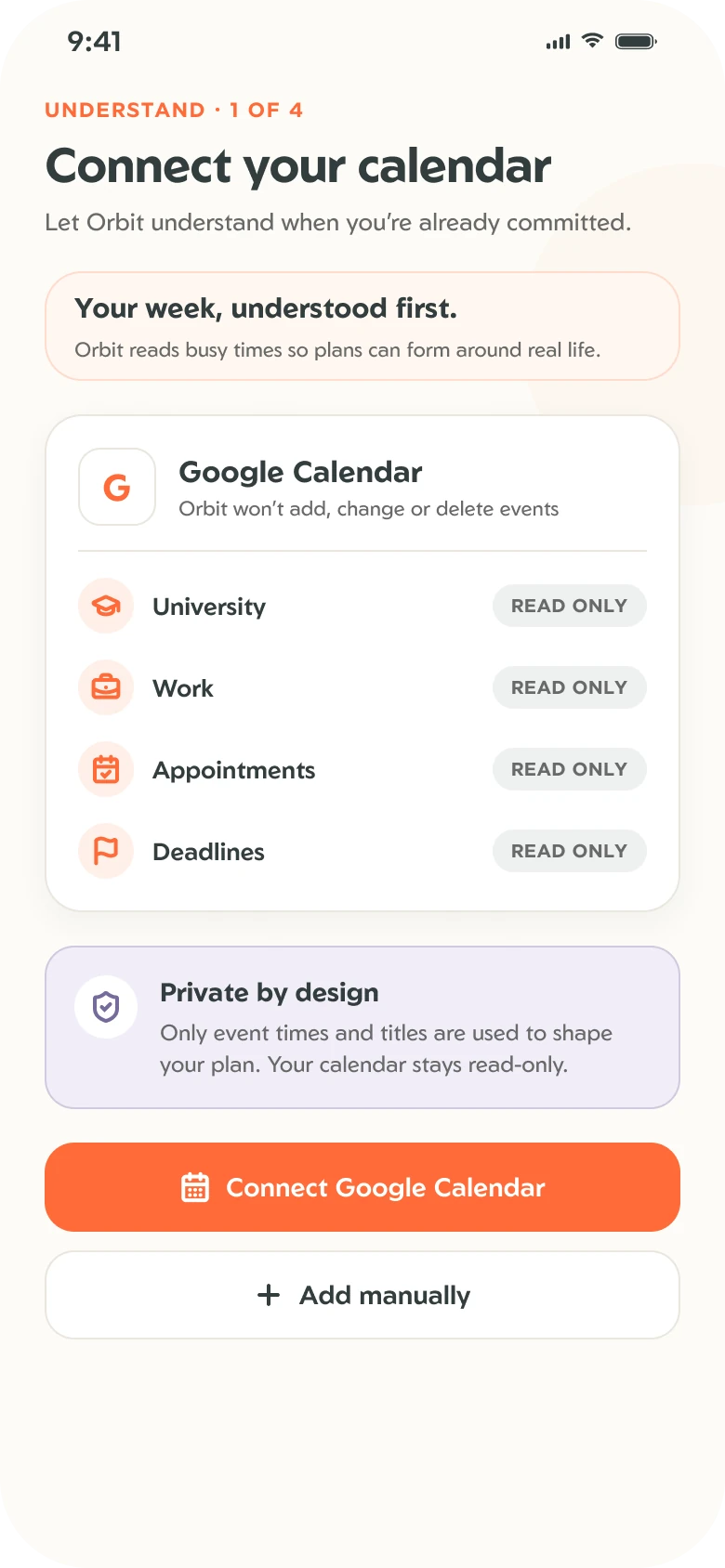
- Orbit reads the week
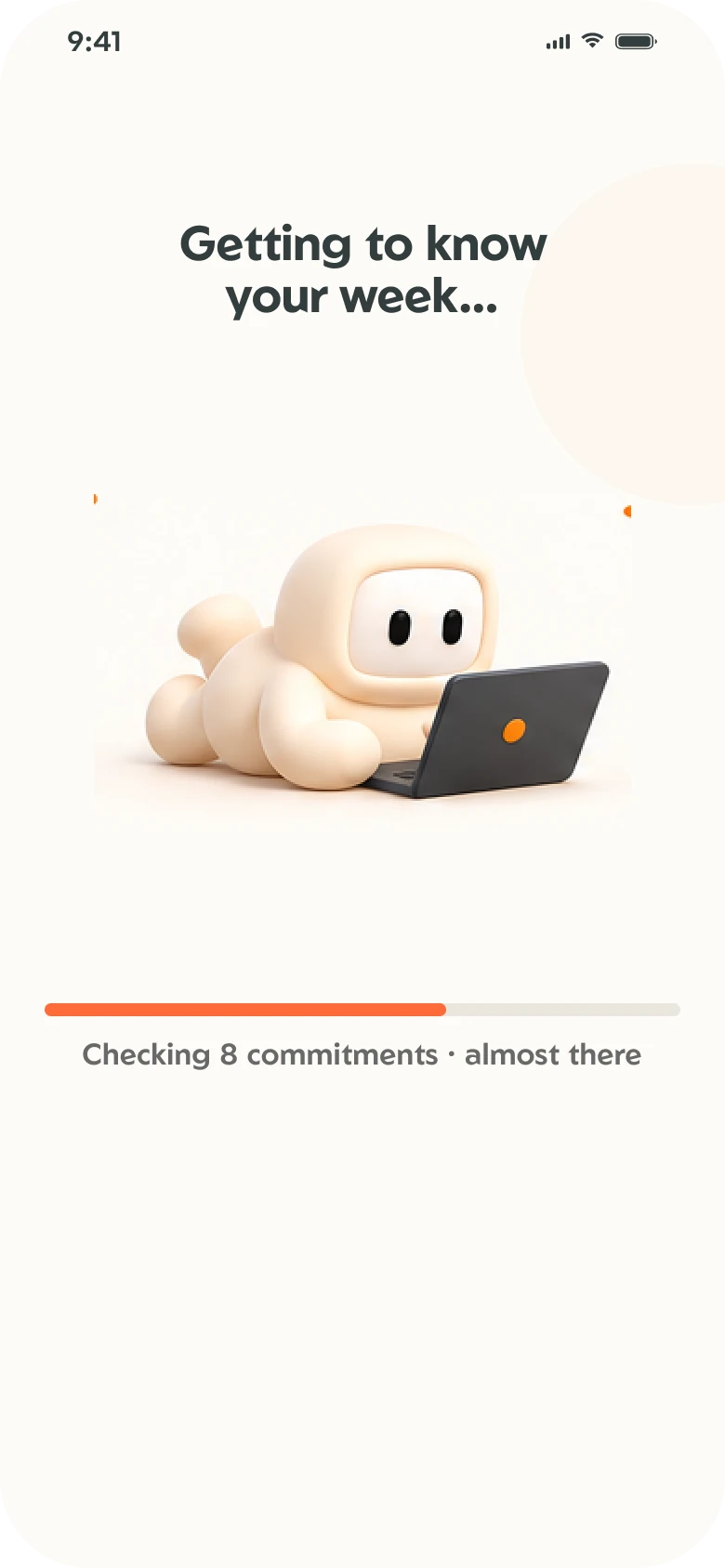
- Confirm the fixed commitments
- Correct anything it misread
Plan
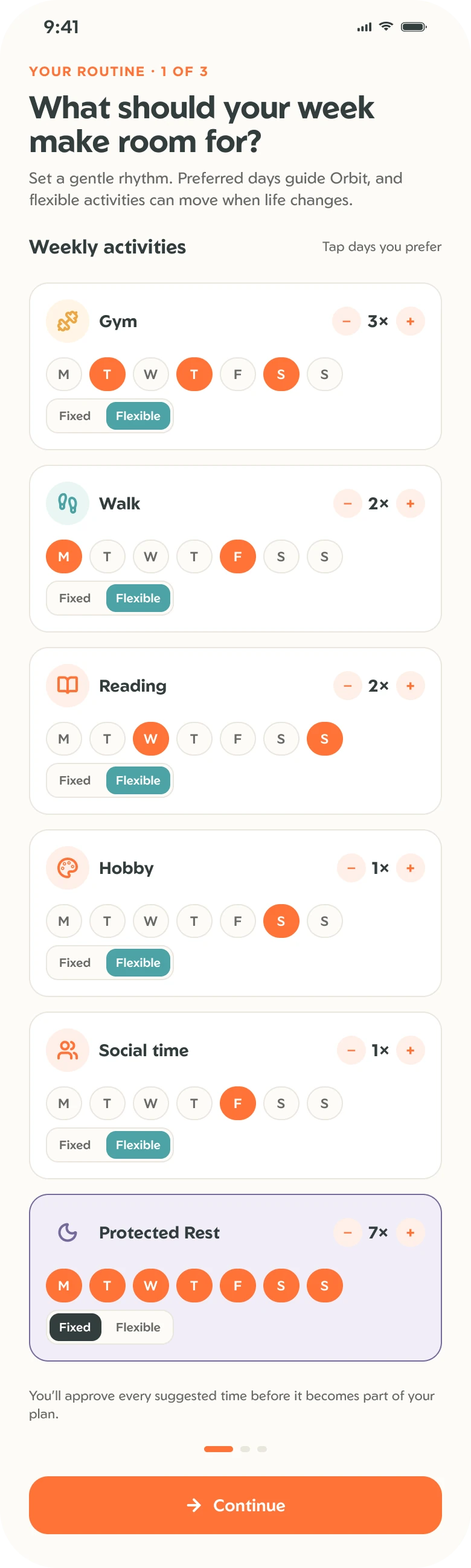
Next, the student describes the week they want: how often, which days they prefer, what stays fixed and which rules keep it realistic. They never place a single activity themselves. Orbit does the placing, and presents the week in the first person, as a companion rather than a system report.
- Set routine goals, not exact times
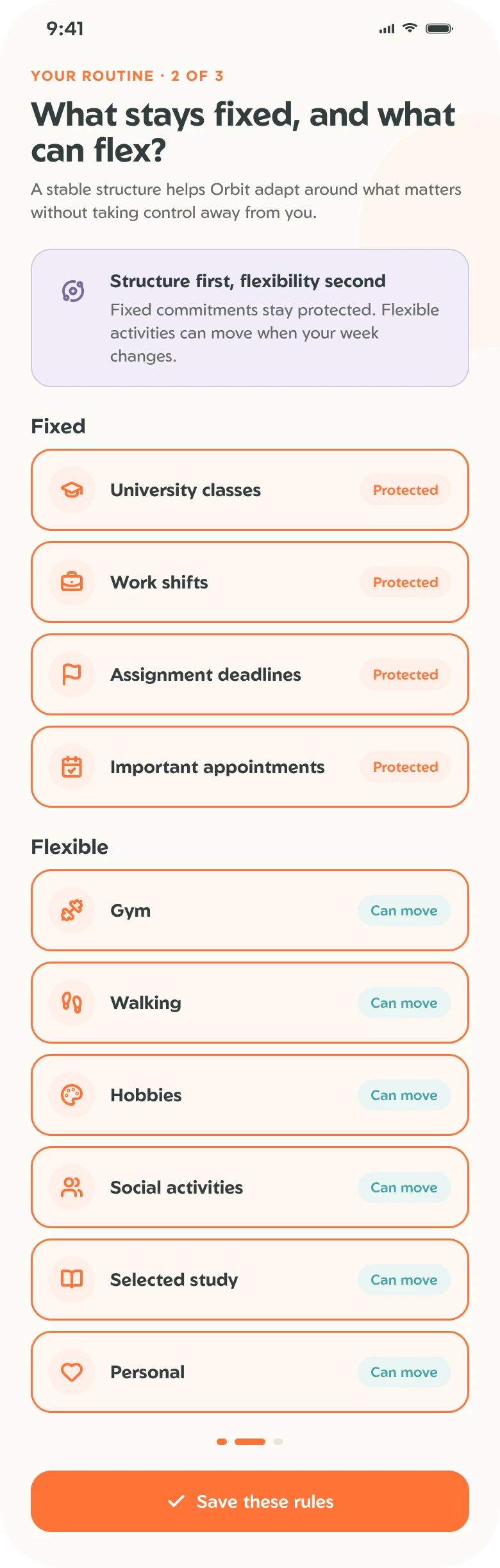
- Decide what stays fixed and what can flex
- Choose the rules that keep it realistic
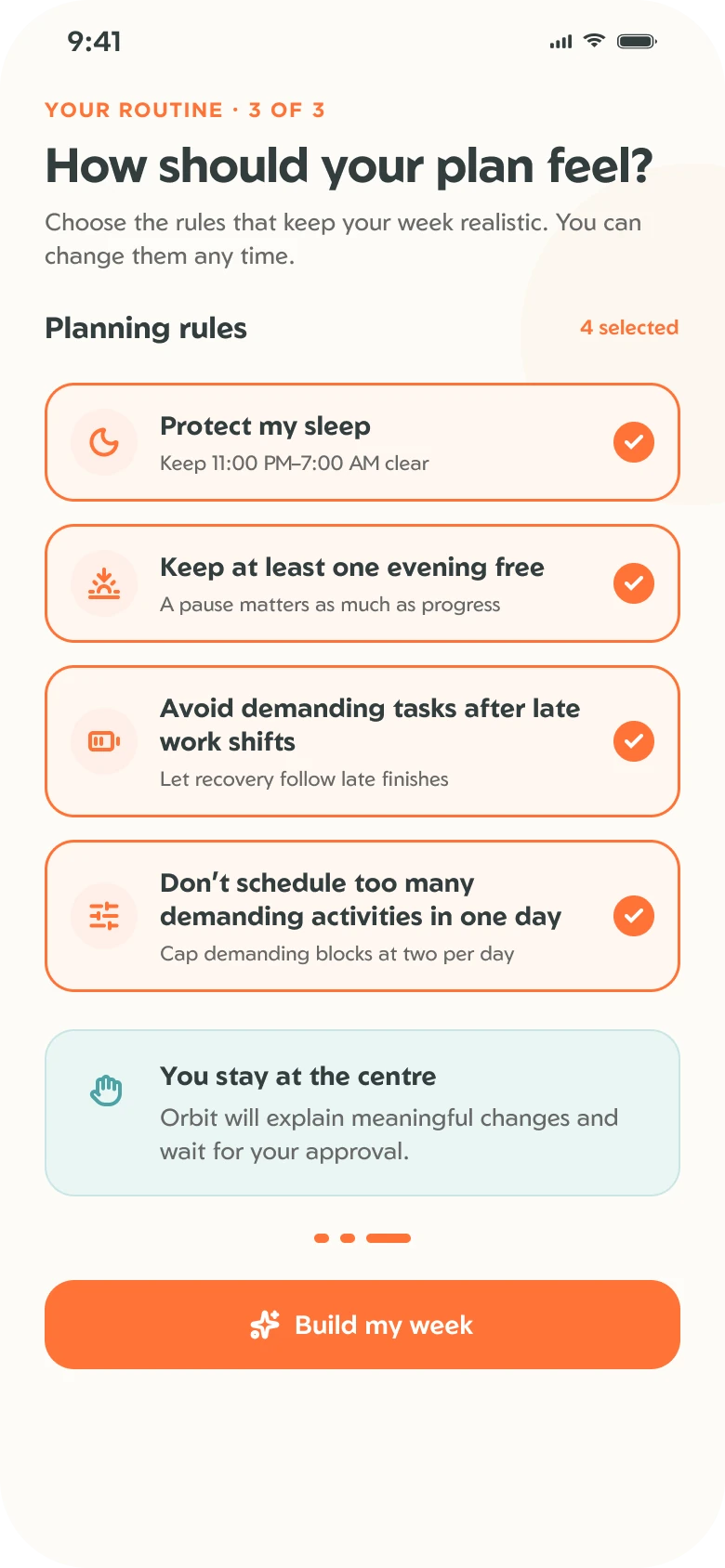
- Accept the week, change it, or ask why
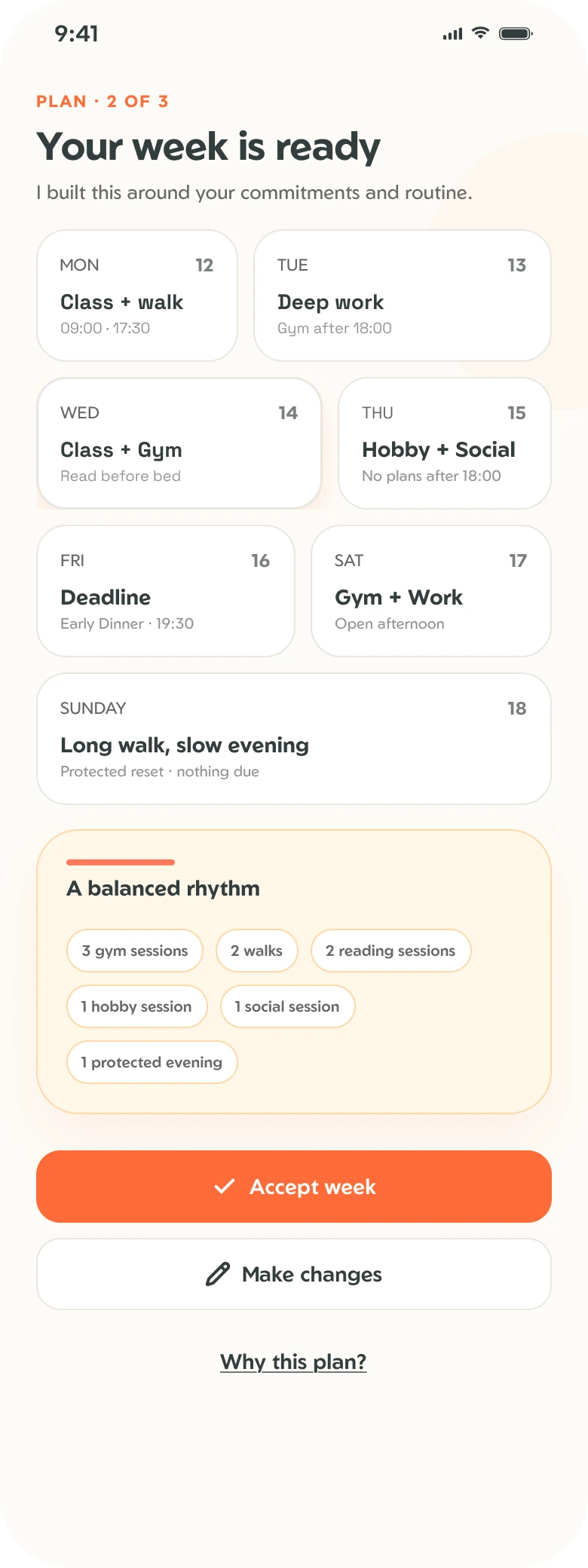
Adapt
When a shift moves, Orbit detects the clash, explains its suggestions and waits for approval. This is where both interaction design principles do their work.
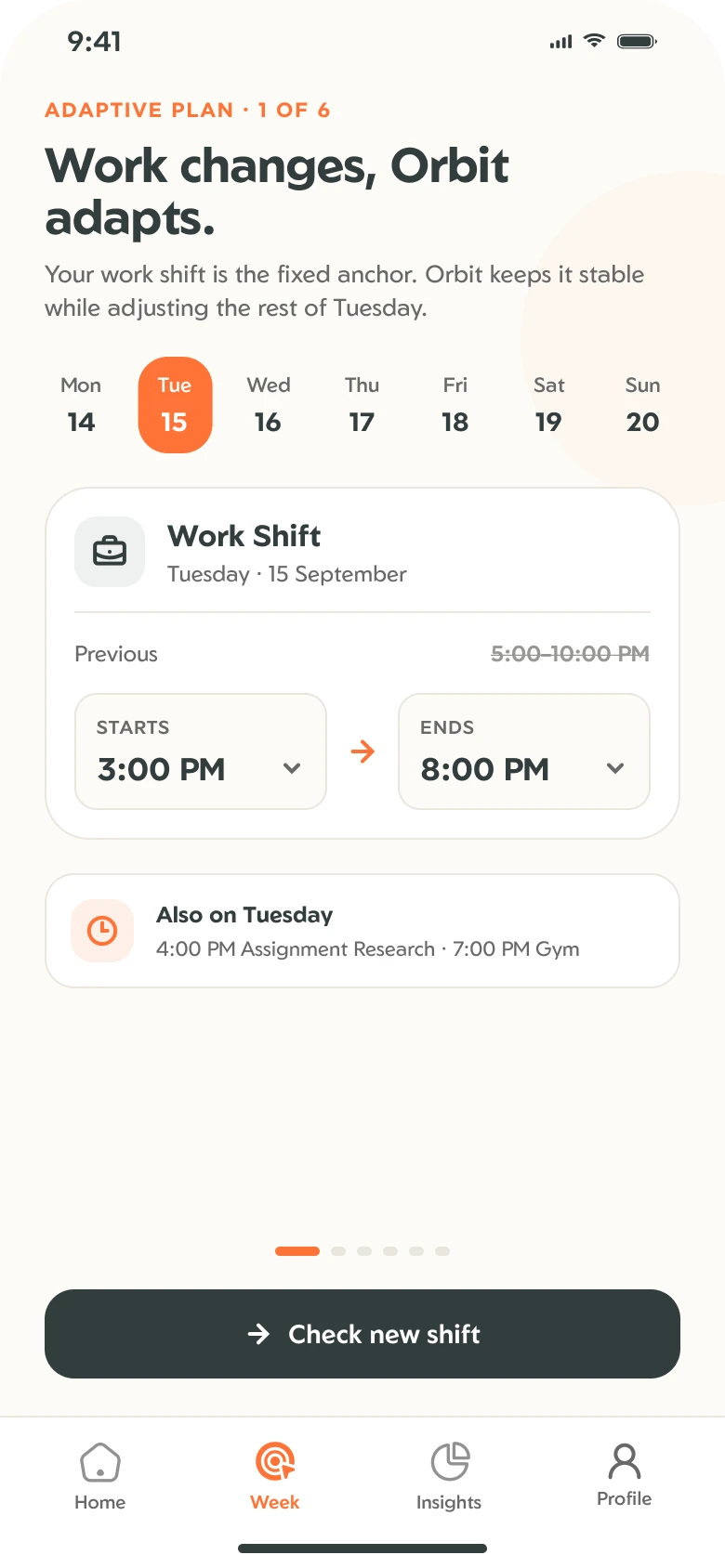
A shift moves
The student updates Tuesday’s shift to 3:00 to 8:00 PM. Orbit treats the new shift as a fixed anchor, keeps the old time visible, and lists what else is planned that day.
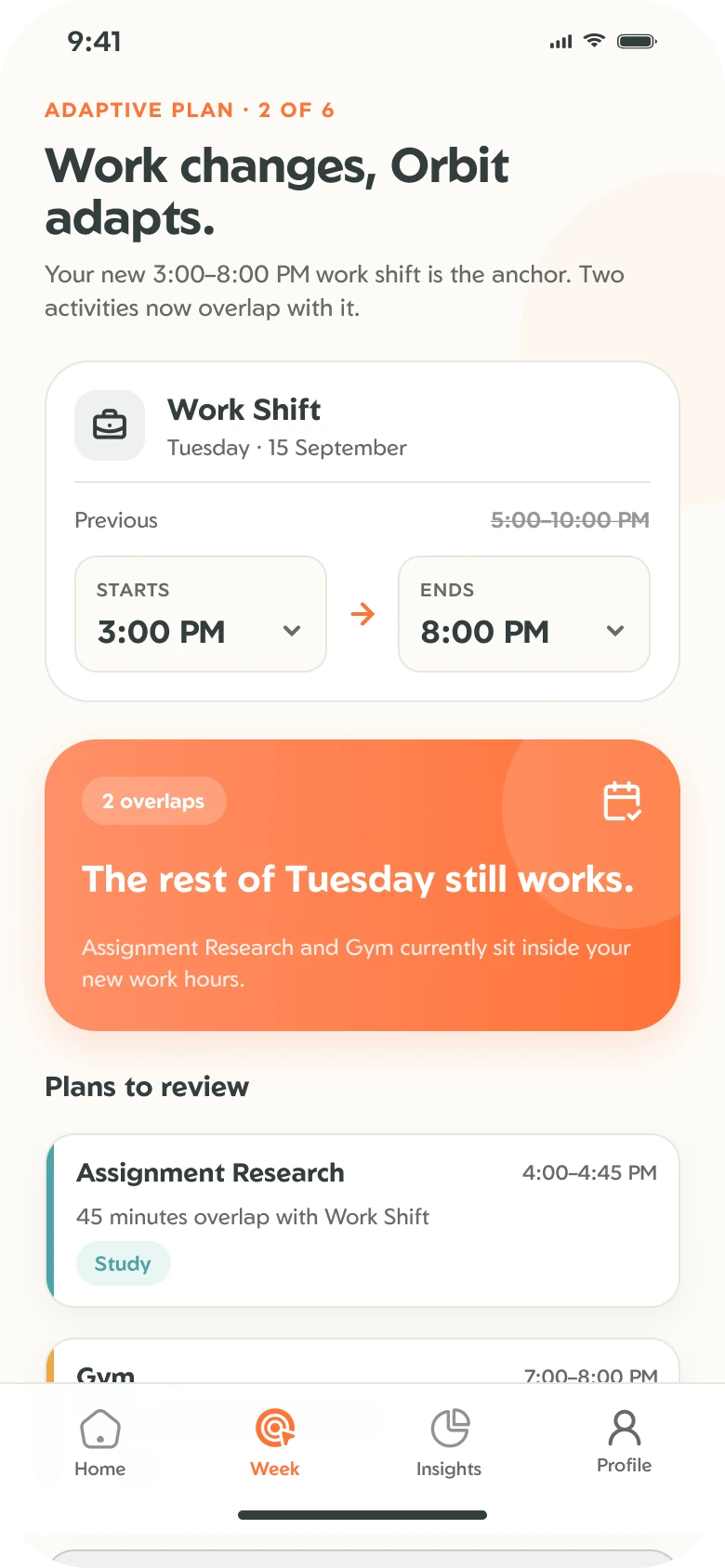
Immediate feedback
The clash, named straight away
The student never has to search the week to find out what a change broke.
- The change is named the moment it happens.
- The previous shift stays visible beside the new one.
- The overlap count appears before any suggestion.
- Each affected activity shows exactly how it clashes.
Minimise memory load
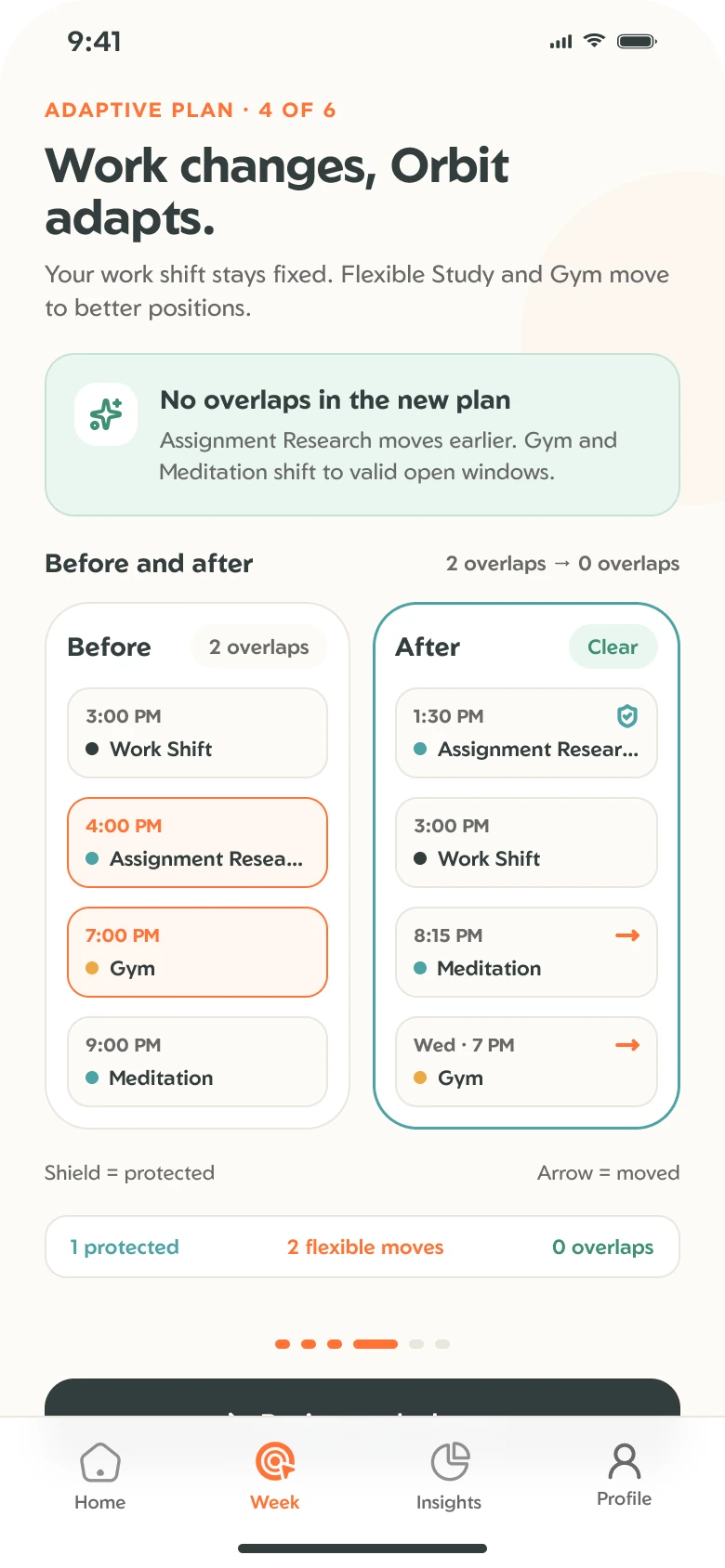
Before and after, side by side
The student doesn’t need to remember the whole week while deciding what should move.
- Before and after sit side by side, so nothing has to be recalled.
- The outcome is summarised in one line.
- A simple legend: a shield means protected, an arrow means moved.
- A closing summary of what stays and what moves.
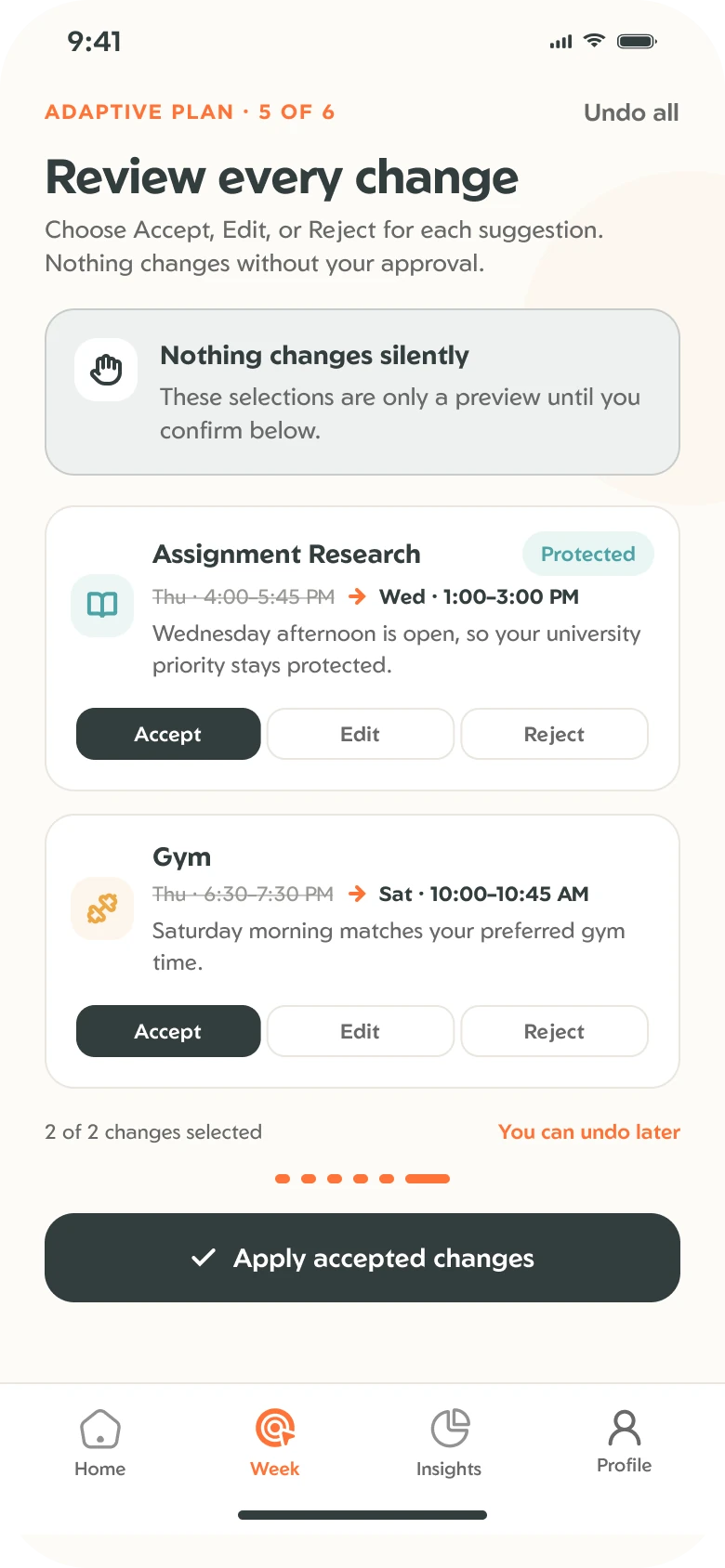
Review every change
- Nothing changes silently: every suggestion is a preview until confirmed.
- Old time struck through, new time in orange, so the change reads at a glance.
- Each move carries its reason, so the student never has to recall the whole week.
- Accept, Edit or Reject per activity keeps the student in control.
- One clear confirmation, and changes can be undone later.
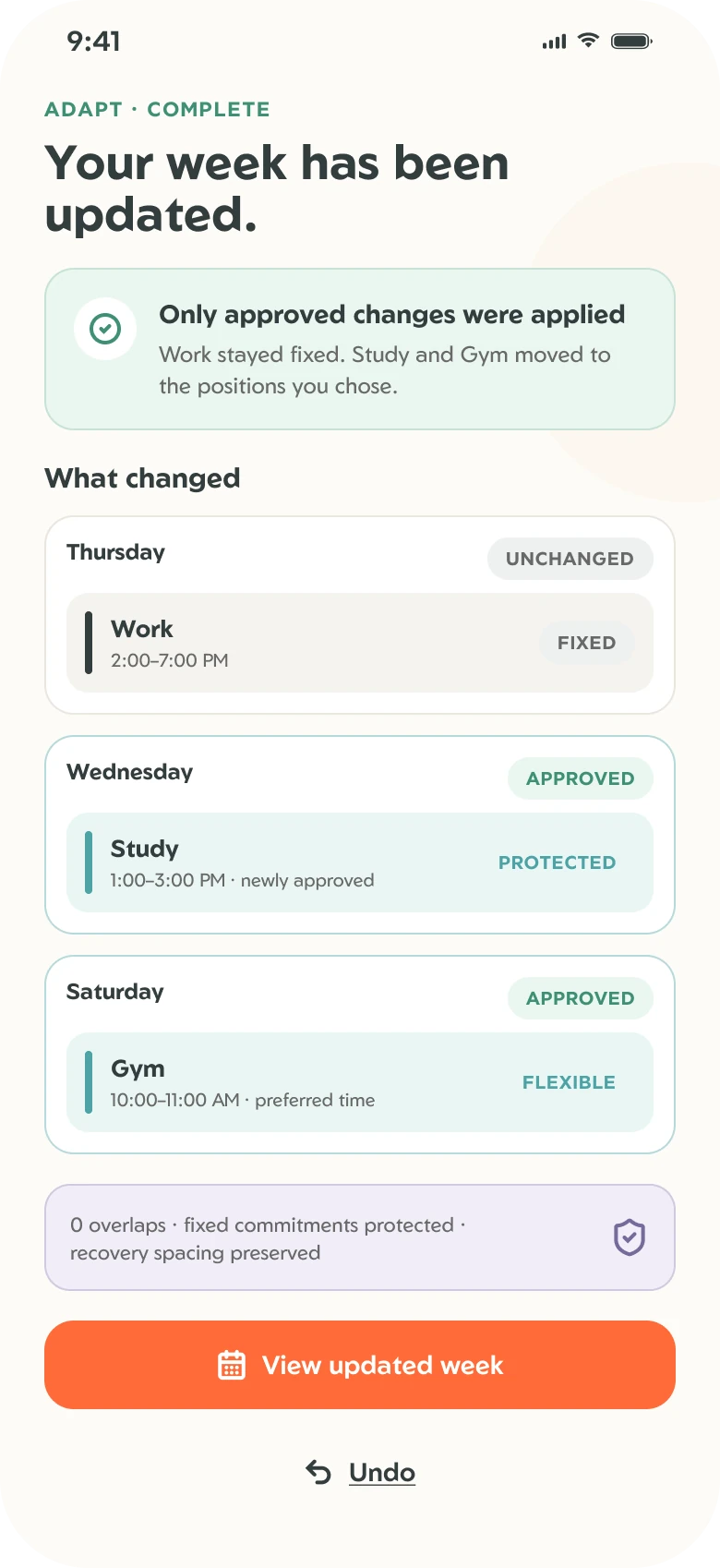
Only approved changes are applied
Work stayed fixed. Study and gym moved to the positions the student chose, with zero overlaps, fixed commitments protected and Undo one tap away.
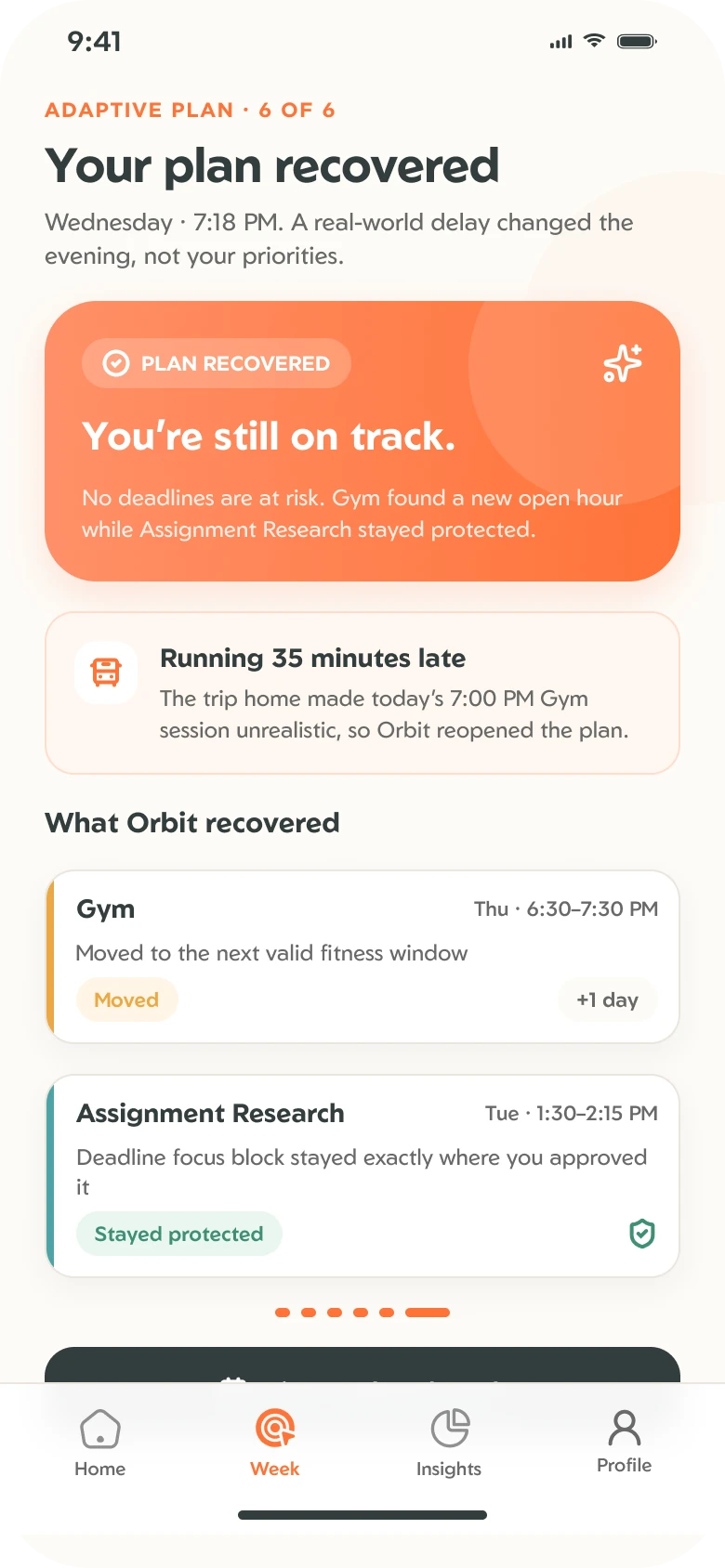
When the day itself slips
Running 35 minutes late made the 7:00 PM gym session unrealistic, so Orbit reopened the plan. Gym moved to the next valid window, and the deadline focus block stayed exactly where the student approved it.
Or move it yourself
Peers asked for a way to move activities manually, so the student can also lift any flexible activity and drop it somewhere better. Fixed work and university stay where they are.
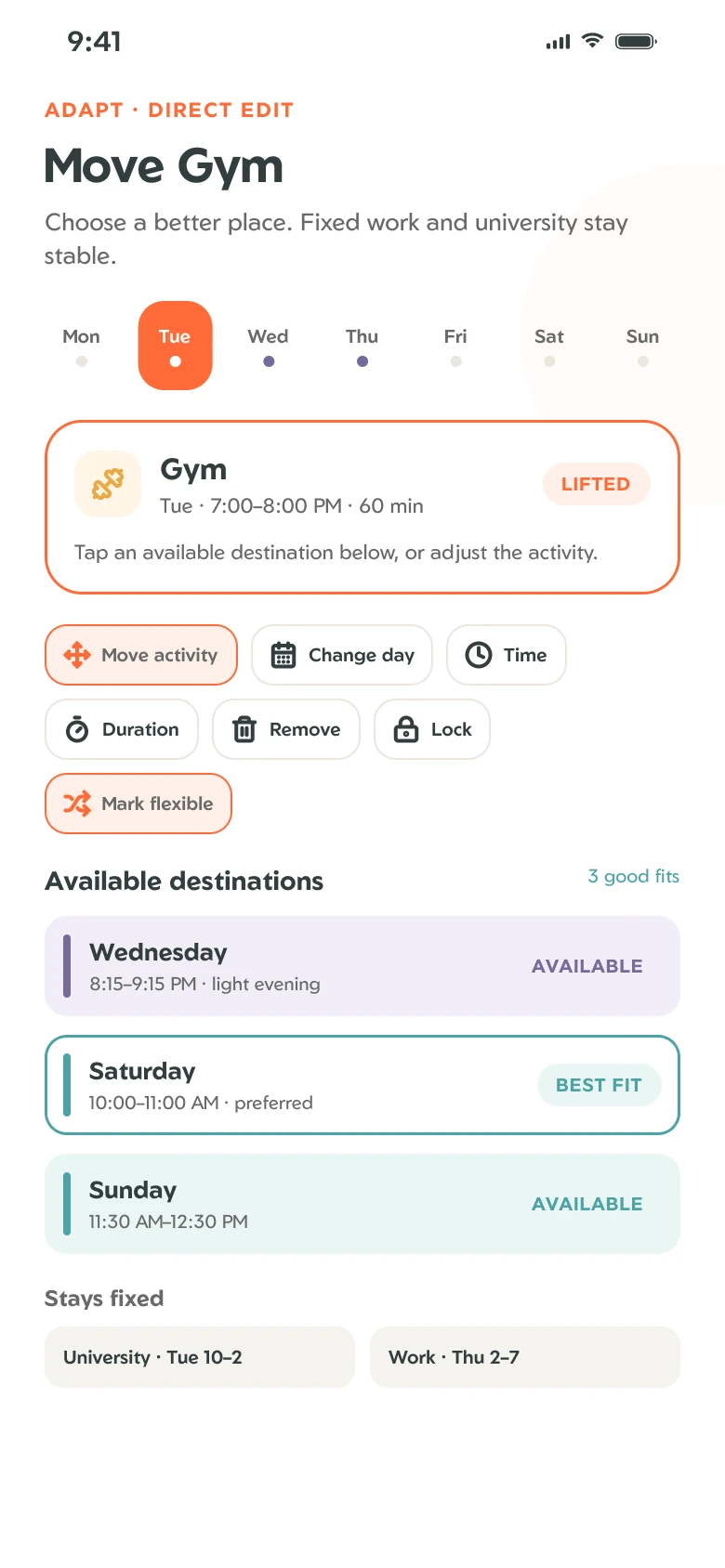
Pick what to move
Gym is lifted from Tuesday evening. Orbit lists the open windows that fit, marks Saturday morning as the best fit, and shows what stays fixed.
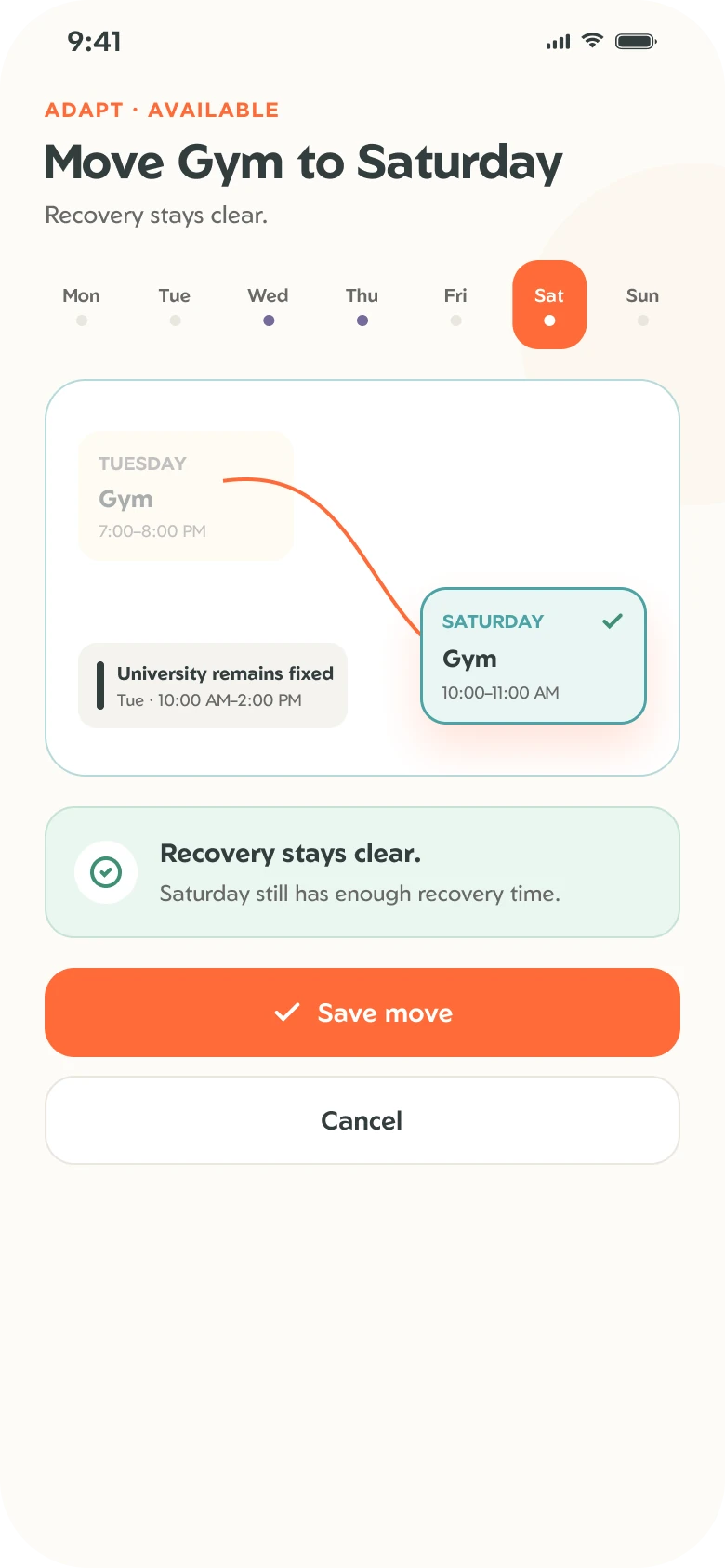
See where it lands
The move is drawn as a path from Tuesday to Saturday, with a check that recovery time stays clear before the student saves it.
Recover
When something still gets missed, Orbit offers one realistic way back, with no red marks and no guilt.
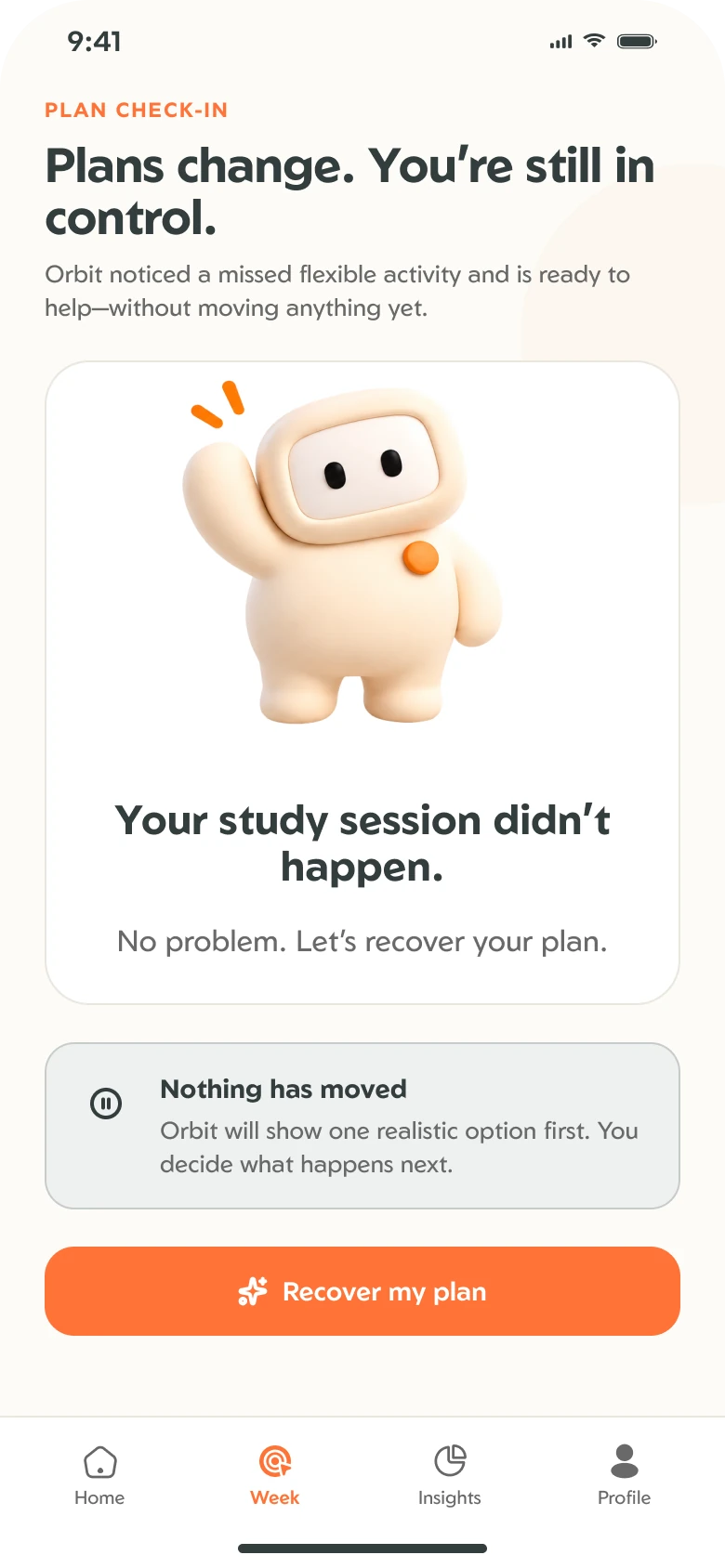
Recovery, not failure
“Your study session didn’t happen. No problem.” Nothing moves until the student chooses to recover.
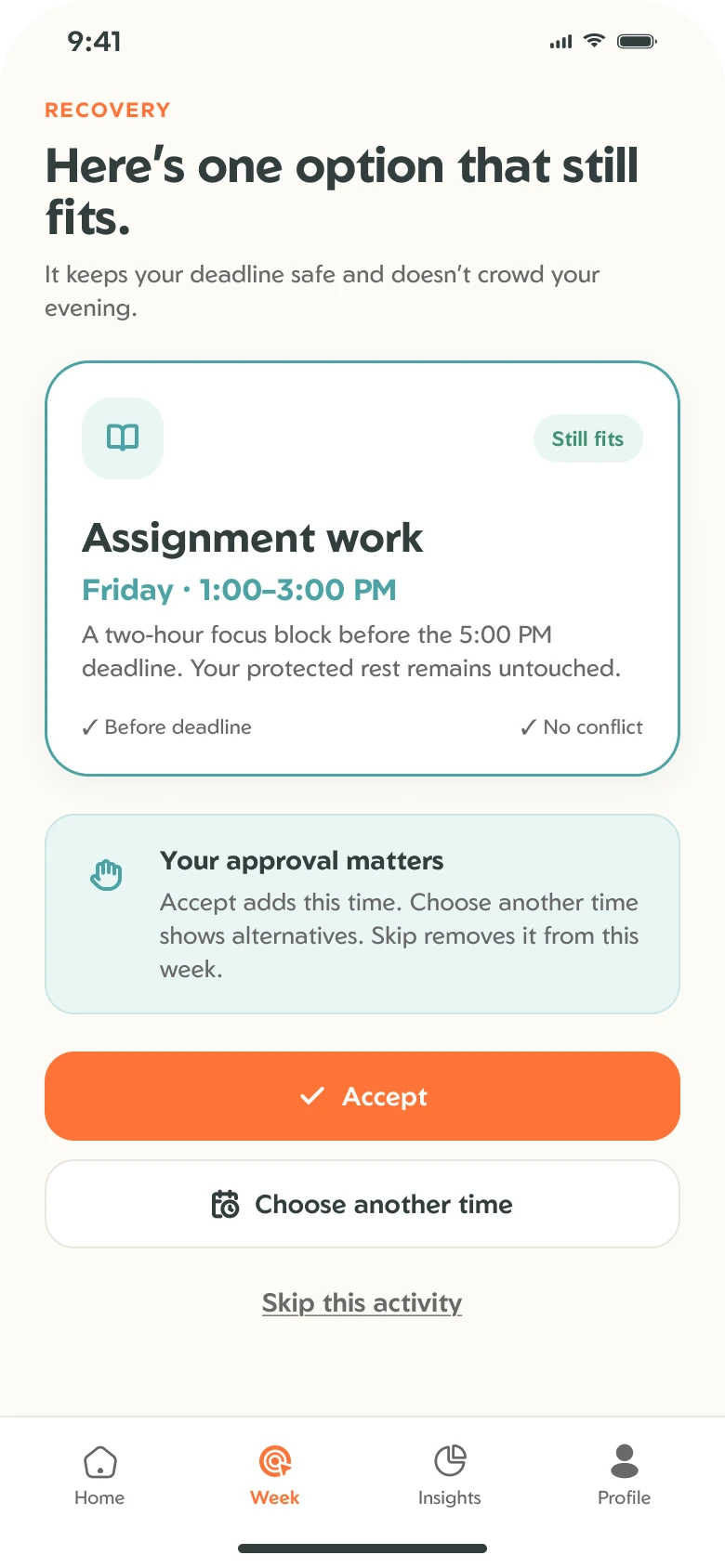
One option that still fits
A two-hour focus block on Friday keeps the deadline safe and the protected rest untouched. The student can accept it, choose another time, or skip it this week.
- Connect the calendar, read-only
Key decisions
Google Calendar integration
Typing in classes and shifts recreates the very friction Orbit set out to remove. Reading the existing calendar lets Orbit start from the student’s real week.
Orbit generates the routine
Students know what they want from their week. They shouldn’t have to work out where every gym session, walk or hobby fits.
The week stays editable
The student knows things Orbit doesn’t. Accept week, Make changes and Why this plan? are always in reach.
Fixed versus flexible
Work, classes and deadlines are protected anchors; gym, walks and hobbies can move. This one rule drives Orbit’s logic.
Nothing changes without approval
Suggestions stay a preview until confirmed, each with Accept, Edit or Reject, a reason and Undo.
Recovery instead of failure
Real weeks are imperfect. A missed task triggers one realistic way back rather than a red mark, and skipping is a valid choice.
Outcome
Orbit is not another calendar. It’s an adaptive layer between a student’s existing commitments and the life they want to keep.
The final prototype isn’t about scheduling more. It helps students keep a realistic week when life doesn’t go to plan: understand the week they have, plan the one they want, adapt when work moves, and recover when something slips.
Reflection
Starting from my own workaround gave me an honest, specific problem, but it also meant watching that I wasn’t only designing for myself. Peer review caught exactly that: my onboarding asked for far more than anyone wanted to type, which is how the Google Calendar connection came about.
The biggest shift across the four iterations was from automation to trust. Early versions moved things for the student; the final one explains every suggestion and changes nothing without approval. Whether Orbit felt helpful depended less on how clever it was and more on how clearly it explained itself.
Next, I’d test Orbit with more students who work casual shifts, over a full semester of real schedule changes, and see how its “do less” suggestions hold up in a genuinely overloaded week.